How to Get More Google Reviews: 15 Proven Ways That Follow Google’s Rules (2026)
Most happy customers never leave a Google review. Not because they didn’t like you, but because nobody asked, or asking took too much effort, or they meant to and forgot by the time they got home.
That’s good news, because it means the gap between you and the competitor with 300 reviews usually isn’t quality. It’s a system. This guide shows you how to get more Google reviews with 15 methods that work for real local businesses, word-for-word templates you can copy, the best moment to ask in your industry, and a calculator that tells you exactly how many reviews you need to hit your target rating. Every method follows Google’s rules, so nothing here can come back to hurt your profile.
How to get more Google reviews, in 5 steps
- Get your review link from your Google Business Profile: Read reviews → Get more reviews.
- Ask every customer, not just the happy ones, right after a good moment.
- Make it one tap: send the link by text or email the same day, and put the QR code where people wait or pay.
- Send one friendly reminder two or three days later if they haven’t left one.
- Reply to every review, so the next customer sees that someone reads them.
Never offer a discount or gift for a review, ask only happy customers, or buy reviews. Google bans all three.
Why more Google reviews matter in 2026
Reviews have always mattered. What’s changed is how picky customers have become about them. BrightLocal’s 2026 survey of 1,002 US consumers found:
68%only use businesses rated 4 stars or higher, up from 55% a year earlier
74%look for reviews written in the last three months
80%are more likely to use a business that replies to all its reviews
Two things follow from that. First, a great rating from 2022 isn’t enough; customers want to see recent reviews. Second, a steady flow of reviews beats a one-off push. Ten reviews a month for a year looks far more trustworthy than 100 reviews in one week and silence after.
There’s a search benefit too. Google says that more reviews and positive ratings can help a business’s local ranking. More reviews means more people find you, which means more customers to ask. It compounds.
How many Google reviews do you need?
Before you work out how to get more Google reviews, work out how many you actually need. It depends on where you are and where you want to be. Put in your current numbers and the rating you’re aiming for:
Review goal calculator
How many 5-star reviews to reach your target?
Assumes every new review is 5 stars, so treat the result as the minimum.
5-star reviews needed54
Total reviews after94
Time to get there18 weeks
At 3 reviews a week, you’d reach 4.7 ★ in about 18 weeks.
If the number looks big, it usually means one of two things: you need a more consistent way of asking (the rest of this guide), or there are fake or policy-breaking reviews dragging your average down. Those can often be removed. Here’s how to remove a Google review that breaks the rules.
Step 0: Get your Google review link and QR code
Whether you’re figuring out how to get Google reviews for the first time or trying to get more of them, everything below depends on one thing: a link that takes customers straight to the review box. Without it, you’re asking people to search for your business, find the reviews tab and work out where to click. Most won’t.
- On a computer, go to business.google.com and open your Business Profile.
- Select Read reviews, then Get more reviews.
- Click the Copy icon to copy your review link.
- To save the QR code, right-click it and choose Save image as…. Google says review QR codes can currently only be made on a computer, not on mobile.
Test it first. Open the link on your phone in a private window. It should go straight to the star rating box. Customers need to be signed in to a Google account to leave a review, so it’s normal to see a sign-in screen.
Ways 1–5: How to get more Google reviews by asking the right way
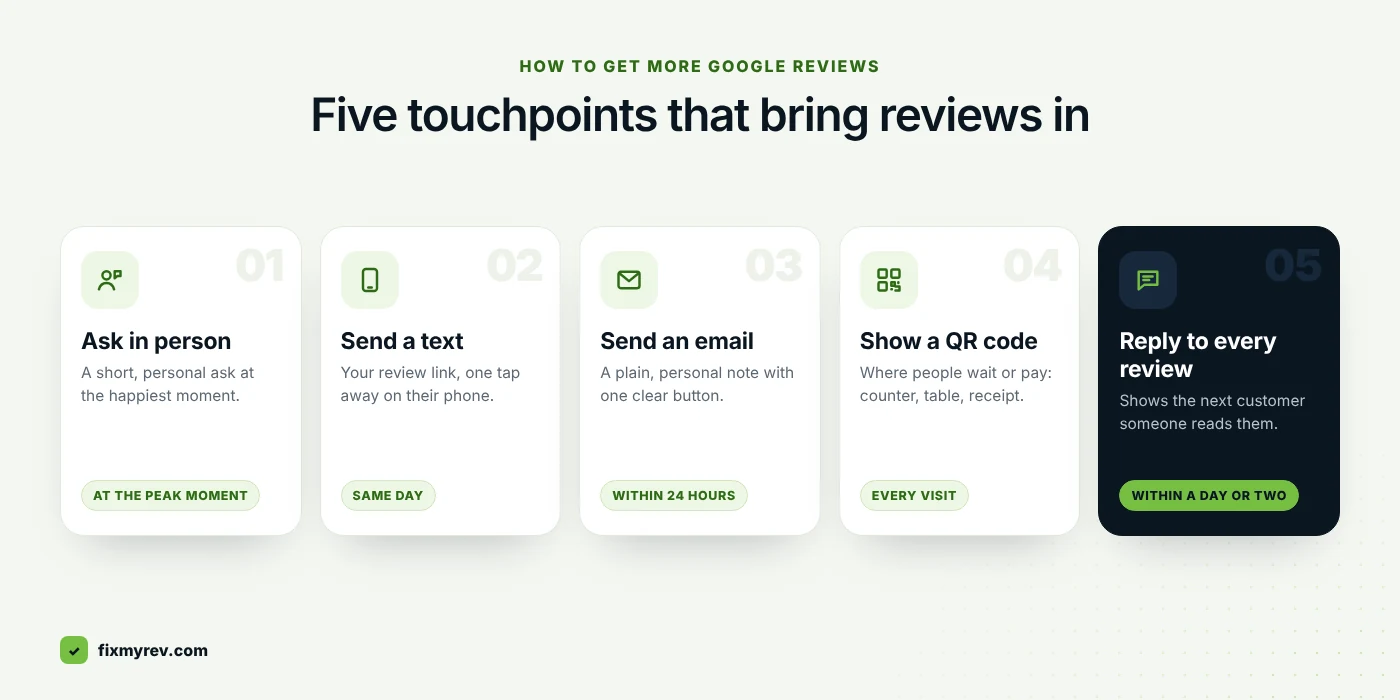
The single biggest reason businesses don’t get Google reviews is that they don’t ask. BrightLocal found 78% of consumers were asked to leave feedback by a business in the past year, so your customers expect it. The question is how you ask.
1. Ask every customer, not just the happy ones
This is the rule people break most often, usually without realising. Google’s policies don’t allow you to selectively ask for positive reviews, a practice known as review gating. Sending a “How did we do?” survey and only passing the happy customers to Google counts. Ask everyone. A few honest 4-star reviews make your 5-stars more believable anyway; Google itself says a mix of feedback often feels more trustworthy.
2. Ask at the “peak moment”
Every business has a moment when the customer is happiest: the car comes back clean, the new smile is revealed, the leak is fixed, the meal is finished. Ask then, or within a few hours. The longer you wait, the more the feeling fades and the more other things fill their day. Find your industry in the timing table below.
3. Ask in person first, then send the link
A face-to-face ask is the strongest, because it’s personal and hard to ignore. But nobody leaves a review standing at your counter. Ask in person, then follow up with the link by text or email so it’s waiting on their phone. The two together work far better than either alone.
4. Make it personal, short and specific
“Please review us” is easy to ignore. “Hi Sarah, it was great sorting your boiler today. Would you mind sharing how it went on Google? It really helps a small team like ours” is not. Use their name, mention what you did, and keep it under 50 words. You can ask them to mention what they liked, but never tell them what to write or what rating to give.
5. Train your whole team to ask
If only the owner asks, you’ll only get reviews on the owner’s shifts. Give every customer-facing person the same short script (it’s in the templates), and track reviews by team member if you like. Celebrate the team when reviews mention them by name. Just don’t let staff review the business themselves: Google treats that as a conflict of interest.
Ways 6–10: Make leaving a review one tap
Every extra step loses people. Your job is to put the review link wherever the customer already is.
6. Send a text message the same day
Text messages are read quickly and the link works with one tap. Send it within a few hours of the visit. Only text customers who gave you their number and agreed to hear from you, keep it short, and include a way to opt out. Messaging rules differ by country (and in the US, by state), so check what applies to you.
7. Send a follow-up email
Email works well for appointments, quotes and online orders. Put the review link in a big, obvious button near the top, not buried under a newsletter. A plain, personal email from a real person usually beats a designed marketing email.
8. Put your QR code where people wait or pay
Customers scan QR codes when they have a spare minute: at the counter, at the table waiting for the bill, in the waiting room, on the van door, on the takeaway bag. Add a short line above the code, like “Enjoyed your visit? Tell us on Google — takes 30 seconds.”
9. Add the link to everything you already send
Receipts, invoices, booking confirmations, your email signature, delivery notes, the thank-you page after an online order, and the end of a live chat. Google itself suggests receipts, thank-you emails and chats. None of these need extra work once they’re set up.
10. Use WhatsApp or Messenger if that’s where you talk
If customers already message you on WhatsApp or Facebook Messenger, ask there. It feels natural, and the link is one tap away. Google lists WhatsApp messages and Facebook posts among the ways to share your review link.
Ways 11–15: How to keep Google reviews coming
11. Send one reminder, then stop
Plenty of people mean to leave a review and simply forget. One polite reminder two or three days later is helpful. Three reminders is pestering, and pestered customers don’t leave 5-star reviews.
12. Reply to every review
BrightLocal found 89% of consumers expect owners to respond to reviews, and half are put off by generic or templated replies. Reply personally, mention something specific, and keep it short. When customers see you read and answer reviews, they’re more willing to leave one. For the hard ones, use our guide on how to get rid of bad reviews on Google.
13. Show off the reviews you get
Put recent reviews on your website, social media and in your shop window. It reminds existing customers that reviews matter to you, and it nudges people who haven’t reviewed yet to join in.
14. Remove the fake reviews dragging you down
Getting more Google reviews is only half the job. If fake or abusive 1-star reviews are pulling your average down, every new 5-star review has to work harder. Reviews that break Google’s policies can be reported and removed. We handle fake Google review removal and negative review removal through Google’s official process.
15. Put it on autopilot
The businesses with hundreds of reviews almost always have a system: every customer gets a request automatically after every visit. You can set this up with booking or CRM software, or we can get more Google reviews for you with SMS and email requests sent to every customer. Every review comes from a real customer, with whatever rating they choose.
Copy-and-paste review request templates
Pick the channel, copy the text, and replace the parts in brackets. Keep the personal touch; it’s what makes people act.
In-person script
“I’m really glad we could help today. Could I ask a small favour? We’re a small team and Google reviews make a big difference to us. I’ll text you the link now. It only takes a minute, and honest feedback of any kind helps.”
Why it works: it’s personal, explains why it matters, and promises the link so they don’t have to search.
The best time to ask for a Google review, by industry
Timing is the most underrated part of how to get more Google reviews. Ask while the good feeling is fresh, through the channel your customers already use:
| Business type | When to ask | Best channel |
|---|---|---|
| Restaurants & cafés | With the bill, or that evening | QR code on the table or receipt, plus email for bookings |
| Medical & dental | Same day, after the appointment | Text or email. Never mention treatment details when you reply. |
| Contractors & home services | When the job is signed off | In person, then a text with the link |
| Salons & spas | At checkout, while they love the result | In person, then text |
| Hotels & hospitality | At checkout or the day after | Email or WhatsApp |
| Professional services | After a milestone or a good outcome | Personal email |
| Online & small businesses | A few days after delivery | Email or order-tracking page |
| Multi-location brands | Same as above, per location | A separate review link for each location |
Why customers don’t leave reviews (and how to fix it)
If customers say yes and still never post, it’s usually one of these. Fix the leak and you’ll get Google reviews from people who already wanted to help:
| The problem | The fix |
|---|---|
| “I forgot” | Ask the same day and send one reminder. |
| “I didn’t know how” | Send the direct review link, not your Maps listing. |
| “I don’t know what to write” | Tell them a sentence or two is plenty, and that honest feedback of any kind helps. |
| “I’m not signed in to Google” | Normal. Most people have a Google account through Gmail or Android; the link prompts them to sign in. |
| “It felt like a chore” | Keep the ask short and the link one tap. Don’t ask them to fill in a survey first. |
What Google doesn’t allow when asking for reviews
Some popular tactics will get your reviews removed and, in some cases, break the law. Avoid these, even if a competitor seems to get away with them:
- Incentives of any kind. No discounts, freebies, prize draws or loyalty points in exchange for a review. Google strictly prohibits it, even if you don’t ask for a positive review.
- Review gating. Asking only happy customers, or filtering people through a survey first, breaks Google’s policies.
- Reviews from staff, or friends and family asked to boost you. Google treats reviews about your own business or workplace as a conflict of interest.
- Buying reviews. Against Google’s policies and illegal in the US, UK and EU. Read what happens when you buy Google reviews before you’re tempted.
- Writing the review for them. Suggesting they mention a service is fine. Handing them the text, or telling them what rating to give, isn’t.
Your 30-day plan to get more Google reviews
Day 1Set up
Copy your review link, save the QR code, and test both on your phone.
Day 2Script
Pick your templates and share the in-person script with your team.
Day 3Place
Add the link to receipts, invoices and email signatures. Print the QR code.
Week 1Start asking
Ask every customer, every day, and send the link the same day.
Weeks 2–4Reply & remind
Reply to every review within a day or two. Send one reminder to those who haven’t reviewed.
Day 30Review
Count new reviews, check the calculator again, and fix whatever step is losing people.
Want more Google reviews without the legwork?
We help businesses in the US and Europe grow and protect their Google rating, honestly and only within Google’s rules.
- Automatic SMS and email review requests to every customer
- Removal of fake and policy-breaking reviews
- A free, review-by-review audit of your profile within 24 hours
Frequently asked questions
What is the fastest way to get more Google reviews?
Ask every customer in person right after a good experience, then text or email your direct Google review link the same day, with one reminder a few days later. It’s the quickest legitimate method, and it keeps working as long as you keep asking.
How do I get my Google review link?
On a computer, open your Business Profile at business.google.com, select Read reviews, then Get more reviews, and copy the link. From the same screen you can save a QR code by right-clicking it.
How do I get Google reviews for a new business?
Start with your very first customers. Ask each one personally, send them your review link the same day, and reply to every review you get. Don’t ask friends or family who haven’t used your business; Google treats that as a conflict of interest.
How many Google reviews should a business have?
There’s no magic number, but you want more than your main local competitors and a steady flow of recent ones. BrightLocal’s 2026 survey found 74% of consumers look for reviews from the last three months, so recency matters as much as the total.
Can I offer a discount for a Google review?
No. Google prohibits offering discounts, free products or any other incentive in exchange for reviews, even if you ask for honest feedback. You can thank customers for their business; you just can’t reward the review.
Is it OK to ask only happy customers for reviews?
No. Selectively asking for positive reviews, known as review gating, is against Google’s policies. Ask every customer. A few honest, less-than-perfect reviews also make your profile look more genuine.
Do Google reviews help local SEO?
Google says more reviews and positive ratings can help a business’s local ranking. Reviews also help people choose you once they find you, which is often where the bigger gain comes from.
Why don’t my customers leave reviews even when I ask?
Usually because it takes too many steps or they forget. Send the direct review link rather than your Maps listing, ask on the same day, keep the message short, and send a single reminder.
Why did some of my Google reviews disappear?
Google removes reviews its systems flag as breaking policy, for example reviews that look incentivised, come from staff, or arrive in a suspicious burst. Asking every customer steadily, without rewards, keeps your reviews safe.
The bottom line
Learning how to get more Google reviews isn’t about a clever trick. It’s about asking every customer, at the right moment, with a link that takes one tap, and then showing that you read what they write. Do it every day for a month and you’ll see the difference. Do it for a year and the competitor with 300 reviews stops looking so far ahead.
Want help getting there faster? See how we get more Google reviews for businesses like yours, or explore our online reputation management service.
Sources
- Local Consumer Review Survey 2026, BrightLocal (February 2026, 1,002 US consumers)
- Create a Google link or QR code to request reviews, Google Business Profile Help
- Tips to get more reviews, Google Business Profile Help
- Prohibited and restricted content, Google Maps User Contributed Content Policy
- How Google determines local ranking, Google Business Profile Help