
How to Remove a Google Review: Step-by-Step Guide (2026)
You open your Google Business Profile and there it is: a 1-star review from someone you’ve never served. Or a former employee getting even. Or a rant that has nothing to do with your business at all.
Here’s the good news. Google does take reviews down, as long as they break its rules. The not-so-good news is that you can’t simply delete them yourself, and Google doesn’t make the process obvious.
This guide shows you how to remove a Google review step by step, using Google’s own tools as they work today. You’ll also see how to delete a Google review you wrote yourself, what to do when Google rejects your report, and how to handle the reviews that can’t be removed at all.
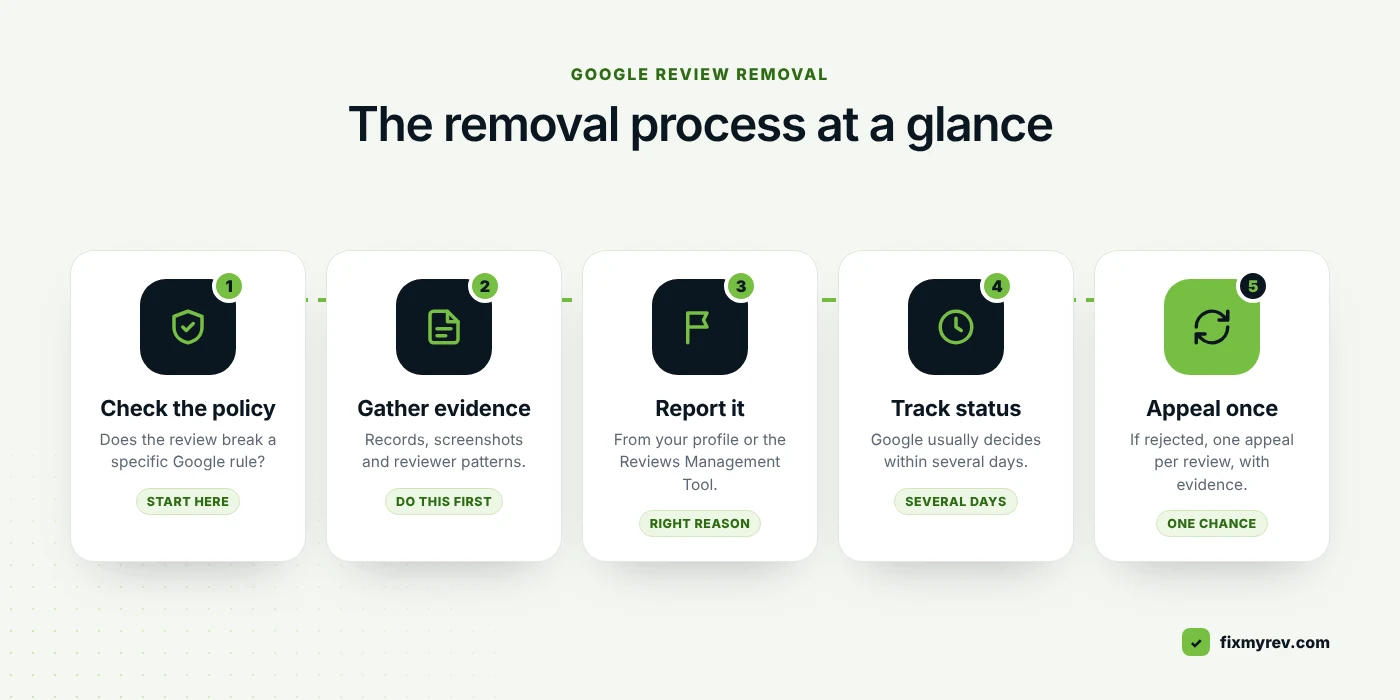
How to remove a Google review in 5 steps
- Check the review breaks a Google policy, such as fake engagement, conflict of interest, off-topic content, harassment or personal information.
- Open your Business Profile on Google Search or Maps and select Read reviews.
- Select the Report icon next to the review, pick the reason that fits, and select Send report.
- Track the report in Google’s Reviews Management Tool. Google usually takes several days to decide.
- If Google finds no violation, submit your one-time appeal from the same tool, with evidence.
Wrote the review yourself? Open Google Maps, go to Menu → Your contributions → Reviews, select More next to the review, then Delete review.
First, which situation are you in?
“Removing a Google review” means different things depending on who you are. Pick the one that fits and jump straight to it.
A review on my business breaks the rules
Fake, spam, competitor, ex-employee, abusive or off-topic.
Report & appeal →
It’s a real customer, just harsh
An honest complaint you’d rather not see on your profile.
Reply & outweigh it →
I wrote the review myself
You want to edit it or delete it from your own account.
Delete your review →
Can you remove a Google review yourself?
Not directly. As a business owner, there’s no button that lets you delete a review from your profile, however unfair it is. Only two parties can make a review disappear:
- Google, when the review breaks one of its content policies.
- The person who wrote it, by deleting it from their own Google account.
Google is also clear that it won’t settle disagreements. “They were rude to me” versus “No, we weren’t” isn’t something Google rules on. So the useful question isn’t “Is this review unfair?” It’s “Does this review break a specific Google policy?” If the answer is yes, you have a genuine chance of getting the Google review removed.
Which Google reviews can be removed?
Google’s rules for reviews live in its prohibited and restricted content policy for Maps. These are the categories that come up most often for local businesses:
| Policy | What it looks like on your profile | Removable? |
|---|---|---|
| Fake engagement | The reviewer was never a customer, the review was paid for, or one person is posting from several accounts. | Yes |
| Conflict of interest | Current or former employees, competitors, or anyone with a personal stake reviewing the business. | Yes |
| Off-topic | Political or social rants, or complaints that aren’t about an experience at your location. | Yes |
| Harassment & hate | Threats, targeting staff, slurs or dehumanizing language. | Yes |
| Personal information | Someone’s phone number, home address, or health or financial details shared without consent. | Yes |
| Obscenity & profanity | Swearing used to offend or to hammer a point home. | Yes |
| Advertising | Links, promo codes or contact details pushing another business. | Yes |
| Impersonation | A reviewer pretending to be someone else, or posing as an official source. | Yes |
| Repetitive content | The same review posted again and again, or text that makes no sense. | Yes |
| Honest bad experience | A real customer describing what really happened, even harshly. | No |
If you’re dealing with reviews from people who never set foot in your business, our page on fake Google review removal covers the warning signs in more depth.
Free 30-second check
Can this Google review be removed?
Tick everything that’s true about the review. It’s a quick guide, not a guarantee, since Google makes the final call.
Tick any box aboveYour result will appear here.
Before you report: gather your evidence
Google can’t see your booking system, your staff rota or your invoices. Before you try to remove a Google review, a few minutes of homework makes your report stronger, and it’s essential if you end up needing to appeal.
- Screenshot the review, including the date, the reviewer’s name and their profile picture.
- Search your customer records. Bookings, invoices, CRM, appointment software. No match at all is strong evidence of fake engagement.
- Open the reviewer’s profile. Brand-new account? 1-star reviews for several of your competitors, or businesses in different cities on the same day? Those patterns matter.
- Look for clusters. Several negative reviews within a few hours or days, with similar wording, often point to coordinated activity.
- Note the exact policy the review breaks, using the table above.
- Keep it all in one document. You’ll paste from it into the appeal form later.
How to remove a Google review: step by step
There are two ways to remove a Google review as the business owner, and both start with a report to Google. The second one makes it much easier to follow up.
Method 1: Report it from your Business Profile
This is the quickest way to flag a single review.
- Sign in with the Google account that manages your Business Profile, then find your business on Google Search or Google Maps.
- Select Read reviews.
- Find the review and select the Report icon next to it.
- Choose the reason that matches the policy the review breaks.
- Select Send report.
Pick the most accurate reason, not the most dramatic one. A review from someone who was never a customer is a fake engagement or conflict of interest issue, not “offensive”. Matching the reason to the evidence gives the reviewer the clearest case to approve.
Method 2: Use Google’s Reviews Management Tool
The Reviews Management Tool is Google’s dedicated page for reporting reviews, checking their status and appealing. If you’re dealing with more than one review, start here.
- Open the Reviews Management Tool.
- If the email shown is the one linked to your Business Profile, select Confirm. If not, select Switch account.
- Select your business.
- Select Continue, then Report a new review for removal, then Continue.
- Next to the review, select Report.
- In the new tab, choose the reason for flagging the review.
- Select Submit.
That’s it. Google now evaluates the review against its policies. If it breaks them, it’s taken down from Maps and Search.
How to check the status of your report
Go back to the Reviews Management Tool and choose the option to check reviews you reported before. Each review shows one of these statuses:
| Status | What it means | What to do |
|---|---|---|
| Decision pending | Google hasn’t evaluated the report yet. | Wait. Don’t re-report it. |
| Report reviewed – no policy violation | Google didn’t find a violation. | You can submit one appeal. |
| Escalated – check your email for updates | Your appeal is being looked at again. | Watch your inbox for the final decision. |
If the review is removed, it simply disappears from your profile.
How to appeal when Google won’t remove a review
A rejected first report is common, and it’s not the end of the road. Google lets you appeal, but only once per review, so it’s worth getting right.
- Open the Reviews Management Tool and confirm your account.
- Select your business.
- Select Continue, then Check the status of a review I reported previously and appeal options, then Continue.
- At the bottom, select Appeal eligible reviews.
- Select the review or reviews you want to appeal. You can pick up to 10 at once.
- Select Continue, then Submit an appeal.
- Complete the form in the new tab, then select Submit.
The appeal form is your one chance to explain what Google’s first check missed. Be specific, stay calm, and name the policy. Here’s a template you can adapt:
Appeal template
This review breaks Google’s fake engagement policy because the reviewer has never been a customer.We checked our booking system and invoices for [time period] and found no record of anyone by this name. The same account posted 1-star reviews for [number] other [type of business] businesses on [date]. The review also mentions [service or product] that we don’t offer.We’d be grateful if you could take a second look at this review.
Swap in the policy and facts that apply to your review. A clear, factual appeal is often what gets a Google review removed on the second look. Leave out how the review makes you feel. Google is checking for a rule break, not weighing who’s right.
How long does it take to get a Google review removed?
Google says review evaluations typically take several days. Appeals take longer, and you get the final decision by email.
Clear, well-evidenced violations tend to move faster. Reports that use the wrong reason, or reviews that sit in a grey area, are the ones that drag on or get rejected. You can’t pay Google to speed things up, and anyone who promises removal by a set date can’t know that for sure.
How to delete a Google review you wrote
Maybe you posted in the heat of the moment, or the business fixed the problem and you’d like to set the record straight. Either way, only you can delete a Google review you wrote, and it takes a minute. Here’s how to delete a Google review on a computer or phone.
On a computer
- Open Google Maps and sign in.
- At the top left, click Menu.
- Click Your contributions, then Reviews.
- Next to the review, click More (the three dots).
- Choose Delete review, or Edit review if you just want to change it.
On a phone
In the Google Maps app, open your profile (your picture, or the Contribute tab, depending on your version), find the review in your list of reviews, tap the three dots next to it and choose Delete review.
Editing instead of deleting? Google shows the date of your last edit as the review’s date, so an updated review moves back up as a recent one.
Can you ask a customer to delete or update their review?
Yes, if you’ve genuinely put things right. Plenty of customers are happy to update a review once a problem is solved. A few ground rules:
- Never offer anything in return. Google’s policies ban offering incentives for reviews or for removing them. A discount for a deleted review can backfire badly.
- Ask once, politely. Pressure, repeated messages or threats can turn a 1-star review into a story.
- Make it easy. Send them the steps to delete a Google review (above) so they don’t have to hunt for them.
Message template
Hi [Name],Thanks again for giving us the chance to put things right with [the issue]. If you feel we’ve made it right, would you consider updating your Google review? No pressure at all, and thank you for the honest feedback either way.[Your name], [Business name]
What to do when a Google review can’t be removed
Some reviews will stay, because they’re honest. That stings, but it’s not the end of your reputation. Here’s what works.
1. Reply calmly and publicly
Your reply is read by every future customer who sees the review. Keep it short, thank them, take responsibility where it’s due, and offer a way to talk offline.
Reply template
Hi [Name], thank you for taking the time to share this. We’re sorry your visit didn’t meet the standard we aim for, especially [specific issue]. We’d really like to make it right. Please get in touch at [email or phone] and ask for [name].
2. Outweigh it with real reviews
The math here is brutal, and it’s why removing a single fake review matters so much:
Your profile today4.8 ★50 reviews
After one fake 1-star4.73 ★51 reviews
5-star reviews needed to get back to 4.819in a row, no new negatives
A steady flow of genuine reviews is the best protection you have. We help businesses get more Google reviews from real customers, without gating or incentives.
3. Keep an eye on your profile
The sooner you spot a fake review, the sooner you can report it. If you run several locations, online reputation management takes the monitoring and reply writing off your plate.
The legal route: defamatory reviews
If a review makes false statements of fact that damage your business, rather than sharing an opinion, it may be defamatory. Google has a separate process to report content for legal reasons. It’s slower, it’s for serious cases, and it usually works best with proper legal advice. We’re not lawyers, so speak to one before you go down this road.
7 mistakes that make Google review removal harder
- Reporting honest reviews. It won’t work, and it wastes the time you could spend on reviews that really do break the rules.
- Choosing the wrong reason. A mismatched reason makes a valid report look weak.
- Getting friends and staff to mass-flag it. Google evaluates the review against its policies, not the number of reports, and coordinated flagging can look like manipulation.
- Offering a refund or gift for removal. Incentives for removing reviews are against Google’s policies.
- Arguing in your reply. Future customers judge you on your response far more than on the review.
- Burying it with fake 5-star reviews. It breaks Google’s rules, and in the US the FTC’s rule banning fake reviews has applied since October 2024.
- Trusting anyone who “guarantees” removal. Only Google decides. Hacks and fake accounts can put your whole profile at risk.
Want a specialist to handle it?
If you’re facing several fake reviews, a rejected report or a competitor attack, we can help you remove Google reviews that break the rules. Our Google review removal service works only through Google’s official reporting and appeal process.
- Free, review-by-review audit within 24 hours
- Evidence-backed reports and appeals, done for you
- An honest answer about what can and can’t be removed
Frequently asked questions
Can a business owner delete Google reviews?
Not directly. A business can report a review that breaks Google’s policies, and Google decides whether to remove it. Only the person who wrote a review can delete it themselves.
How many times can I appeal a Google review decision?
Once per review. After Google marks a report as “no policy violation”, you can submit a single appeal through the Reviews Management Tool, so include all your evidence the first time.
Will the reviewer know I reported their review?
Reports go to Google, not to the reviewer. If the review is removed, it simply stops appearing on your profile.
Can I get a Google review removed if it’s unfair but from a real customer?
Only if it also breaks a policy, for example by including personal information, threats or profanity. A genuine but harsh opinion stays up. Reply professionally and focus on earning new reviews.
Does reporting a review from several accounts help?
No. Google judges the review against its policies, not the number of reports. One accurate, well-evidenced report from the business owner is worth more than a pile of duplicate flags.
Can you remove a star-only Google review with no text?
Sometimes. With no text there’s less to go on, but if you can show the person was never a customer, or it’s part of a wave of fake ratings, it can still be reported as fake engagement.
How do I delete a Google review I left by mistake?
On a computer, open Google Maps, go to Menu → Your contributions → Reviews, click More next to the review and choose Delete review. The full steps are above.
The bottom line
You can’t delete reviews from your own profile, but you can get a Google review removed when it breaks the rules. Check the policy, gather your evidence, report it through the Reviews Management Tool, and make your one appeal count. For the honest reviews that stay, a calm reply and a steady flow of real 5-star reviews will do far more than any argument.
Not sure whether a review qualifies? Send it to us and we’ll tell you straight.
Sources
- Report inappropriate reviews on your Business Profile, Google Business Profile Help
- Prohibited and restricted content, Google Maps User Contributed Content Policy
- Write, edit or delete reviews, Google Maps Help
- Read and reply to reviews, Google Business Profile Help